
Slack Pricing Plans Explained: The Free Slack Download vs Pro, Business+ and Enterprise+

The Slack download itself is always free: the desktop and mobile apps cost nothing, and you can sign in to any workspace with them. What you pay for is the workspace plan. Slack currently sells four plans, Free, Pro, Business+ and Enterprise+, and the differences show up in message history, app limits, huddle size, AI features, security and admin controls.
This guide sets out the prices and limits exactly as Slack publishes them on its official pricing page and help center. SlackDownload.com is a third-party guide, not a Slack reseller, so there are no affiliate links or special deals here.
Prices checked . Slack can change prices at any time, so confirm on slack.com before you buy.
Slack plans and prices at a glance
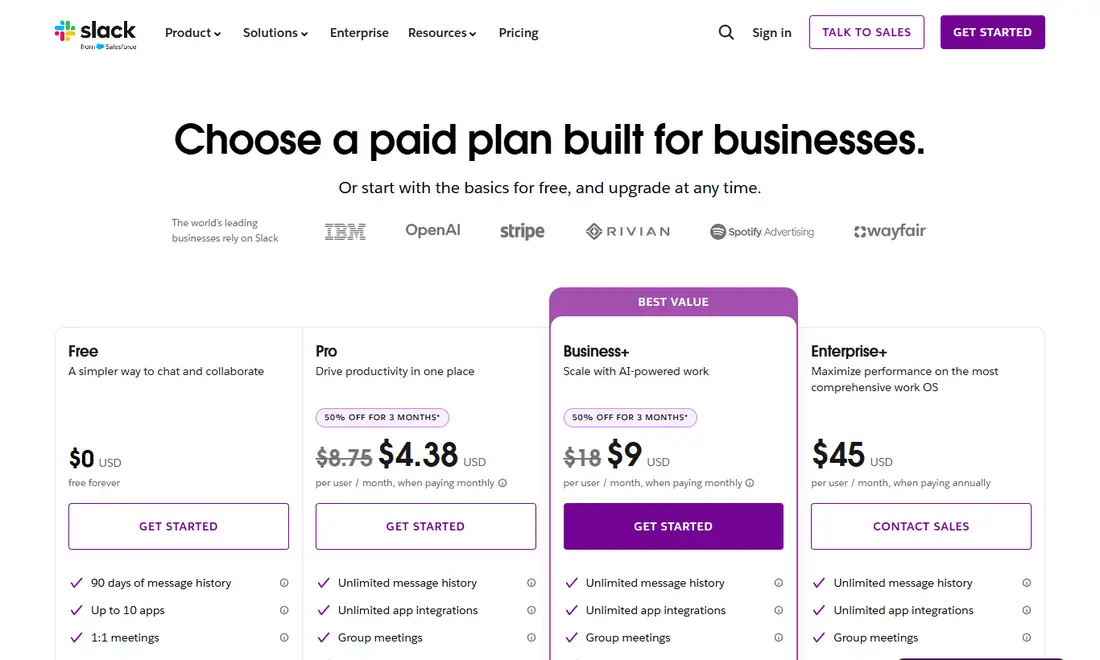
All prices are in US dollars, per user per month. Paying annually costs less than paying month to month.
| Plan | Paid annually | Paid monthly | Slack's tagline |
|---|---|---|---|
| Free | $0 | $0 | A simpler way to chat and collaborate |
| Pro | $7.25 | $8.75 | Drive productivity in one place |
| Business+ | $15 | $18 | Scale with AI-powered work |
| Enterprise+ | $45 (contact sales) | Not listed | Maximize performance on the most comprehensive work OS |
Slack sometimes runs introductory discounts on Pro and Business+, shown as a struck-through price on the pricing page. Treat those as temporary; the figures above are the standard rates. Business+ carries a "Best value" label, and Enterprise+ is bought through Slack's sales team.
Slack free plan: what you get and the limits
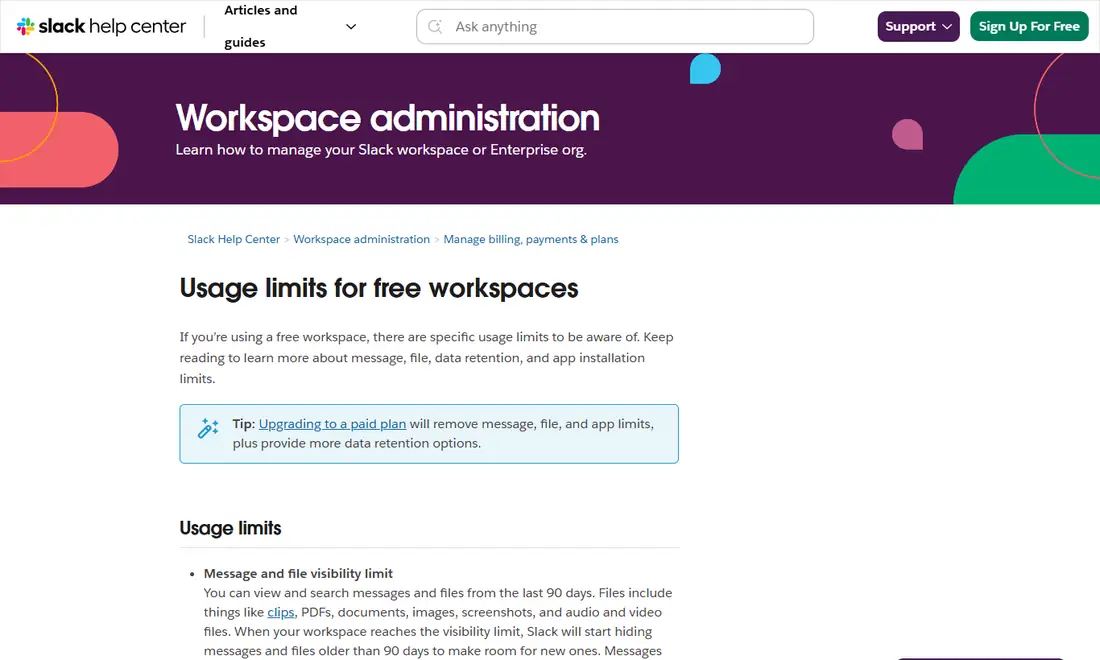
The Free plan is "free forever" and is a sensible place to start a small team or test Slack before paying. Slack's usage limits for free workspaces article spells out the restrictions:
- 90-day visibility: you can view and search messages and files from the last 90 days. Older items are hidden to make room for new ones.
- One-year deletion: messages and files more than one year old are permanently deleted.
- Data retention: workspace owners can keep all messages and files for one year, or delete them after 90 days.
- Apps: up to 10 third-party or custom apps. To add more, uninstall one first.
- Huddles and Slack Connect: 1:1 only. A free-plan huddle can have a maximum of two participants.
- High-volume limit: Slack may stop you sending too many messages or files in a short period, to prevent spam.
Files covered by the 90-day limit include clips, PDFs, documents, images, screenshots and audio and video files. Upgrading to a paid plan removes the message, file and app limits.
Pro, Business+ and Enterprise+ compared
Every paid plan includes unlimited message history, unlimited app integrations, group huddles and group Slack Connect conversations. Paid-plan huddles can include up to 50 people, with up to 25 on video (see our Slack huddles and calls guide). Beyond that, the plans split on collaboration extras, security and administration. These rows come from Slack's "Compare all features" table:
| Feature | Free | Pro | Business+ | Enterprise+ |
|---|---|---|---|---|
| Message and file history | 90-day limit | Unlimited | Unlimited | Unlimited |
| Integrations with other apps | 10 | Unlimited | Unlimited | Unlimited |
| Huddles / Slack Connect | 1:1 only | Group | Group | Group |
| Canvases and lists | Not included | Included | Included | Included |
| Templates | Not included | User-created | User-created | Admin-created |
| Single sign-on | Not included | OAuth with Google | SAML-based | Supports Multi-SAML |
| Workspaces | 1 | 1 | 1 | Unlimited |
| Channel posting permissions | #general only | #general only | Any channel | Any channel |
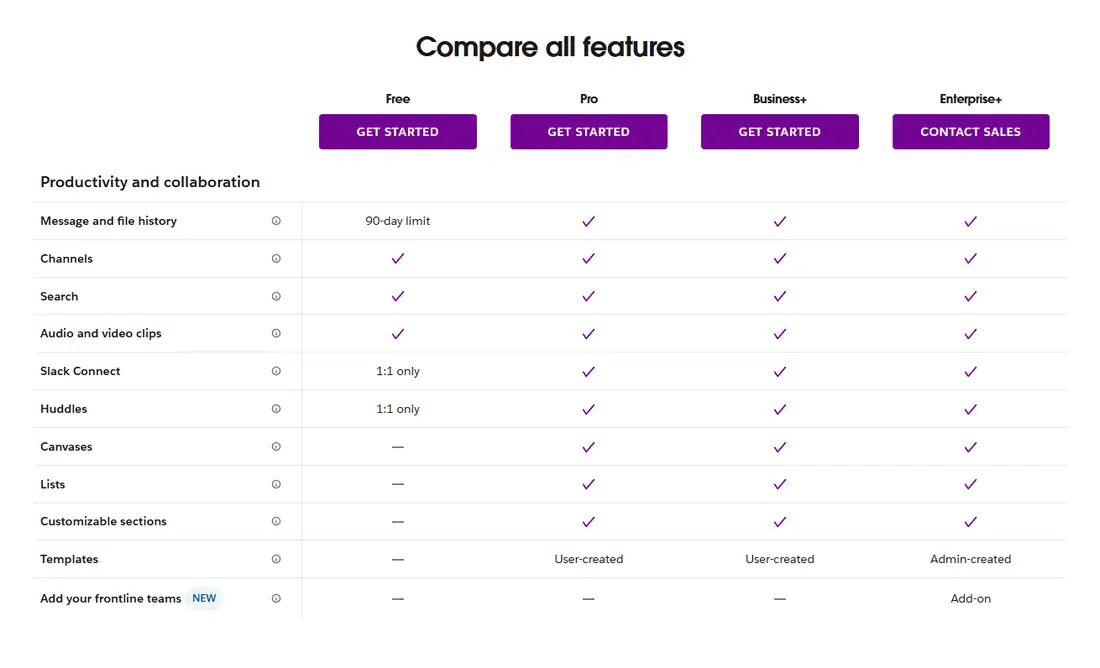
Slack's paid vs free comparison adds a few more distinctions. It lists Business+ with SAML-based SSO, data exports and SCIM provisioning, while Pro shows admin tools and user management as not included. Enterprise+ adds enterprise-scale extras such as Slack Enterprise Key Management (as an add-on) and support for multiple SAML configurations.

Slack AI features by plan
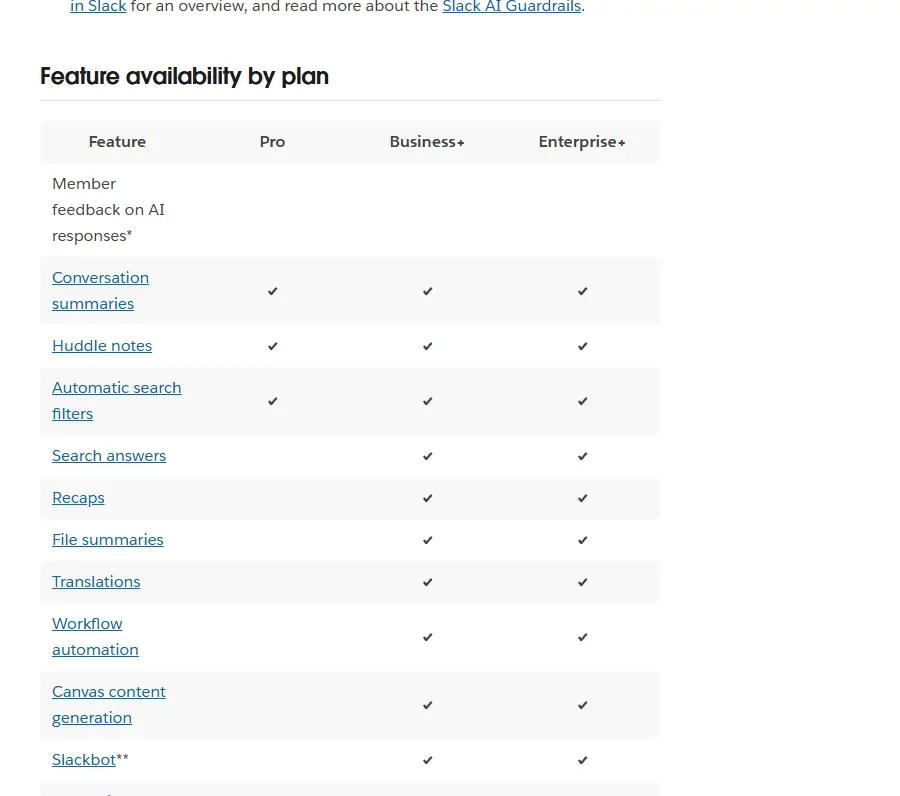
AI is where the plan labels can confuse people. The pricing page tags Free and Pro with "Basic AI", Business+ with "Advanced AI" and Enterprise+ with "Enterprise-Grade AI", and each plan card lists AI items such as conversation summaries, Slackbot, workflow generation, AI search, daily recaps and file summaries. Slack's own guide to AI features is more precise, so we follow its "Feature availability by plan" table:
| AI feature | Pro | Business+ | Enterprise+ |
|---|---|---|---|
| Conversation summaries | Yes | Yes | Yes |
| Huddle notes | Yes | Yes | Yes |
| Automatic search filters | Yes | Yes | Yes |
| Search answers, recaps, file summaries | No | Yes | Yes |
| Translations, workflow automation, canvas content generation | No | Yes | Yes |
| Slackbot | Limited preview | Yes | Yes |
| Enterprise search | No | No | Yes |
According to Slack's AI guide, Slackbot may be available to preview in a limited capacity on the Free and Pro plans. Workspaces on the legacy version of Business+, or on Enterprise Grid without the Slack AI add-on, only get the Pro-level AI features. The paid vs free page matches this split: it lists "AI conversation summaries" for Pro and "AI search, AI workflow generation, daily recaps, and file summaries" for Business+. Our Slack AI features guide explains how to use each one.
What Slack costs for a real team
Per-user prices are easy to underestimate, so here is the arithmetic using Slack's published rates. These are list prices before tax and before any introductory discount, and Enterprise+ is quoted by sales, so treat its row as a guide only.
| Team size | Pro (annual) | Pro (monthly) | Business+ (annual) | Business+ (monthly) |
|---|---|---|---|---|
| 5 users | $36.25/month ($435/year) | $43.75/month | $75/month ($900/year) | $90/month |
| 10 users | $72.50/month ($870/year) | $87.50/month | $150/month ($1,800/year) | $180/month |
| 25 users | $181.25/month ($2,175/year) | $218.75/month | $375/month ($4,500/year) | $450/month |
For comparison, 25 users on Enterprise+ at the listed $45 would be $1,125 per month. Annual billing on Pro saves $18 per user per year compared with paying monthly; on Business+ the saving is $36 per user per year. Monthly billing still makes sense if your headcount changes often or you are only trialling a paid plan for a short project.
When the free plan stops being enough
Most teams outgrow Free for one of three reasons. The first is history: once conversations from three months ago start disappearing from search, decisions and files become hard to find. The second is apps: 10 integrations fill up quickly once you connect a calendar, a file store, a ticketing tool and a few bots, and Slack's high-volume limit can also slow bots that post a lot of messages. The third is calls: a two-person huddle cap rules out quick group check-ins. If none of these affect you yet, there is no rush to pay.
How to choose the right Slack plan
- Start with Free if you are a small group, a club or testing Slack. Accept that only the last 90 days are visible and calls are 1:1.
- Pick Pro when you need full history, more than 10 apps, group huddles or shared channels with clients. It is the cheapest way to remove the free limits.
- Pick Business+ if you need SAML single sign-on, SCIM provisioning, data exports, posting permissions in any channel or the wider AI set (search answers, recaps, file summaries, translations and Slackbot).
- Talk to sales about Enterprise+ when you run several workspaces, need enterprise search across connected tools, or have compliance needs such as Enterprise Key Management.
Always compare the annual and monthly price: on Pro the gap is $1.50 per user per month, and on Business+ it is $3. If you are weighing Slack against other tools, see our Slack vs Microsoft Teams vs Discord comparison.
Does the plan change the Slack download?
No. The same Slack app works on every plan, so there is no separate "Pro" or "Business" download. You install Slack once from Slack's official downloads page or an official app store, sign in, and the features your workspace pays for appear automatically. On November 6, 2026 the Windows and Mac download pages showed version 4.53.280.
The requirements are the same on every plan: Windows 11 version 23H2 or above, macOS 13 or above, Ubuntu 22.04 or RHEL 9.0 or above for the Linux beta, iOS 17 or above and Android 11 or above. Windows 10 is not on Slack's current supported list. Slack's support lifecycle page also lists macOS 13, iOS 17 and Android 11 as reaching end of support on November 9, 2026, so check the official requirements page after that date. For organization-wide rollouts, our Slack download guide for IT teams covers MSIX and PKG deployment.
Billing questions and avoiding scams
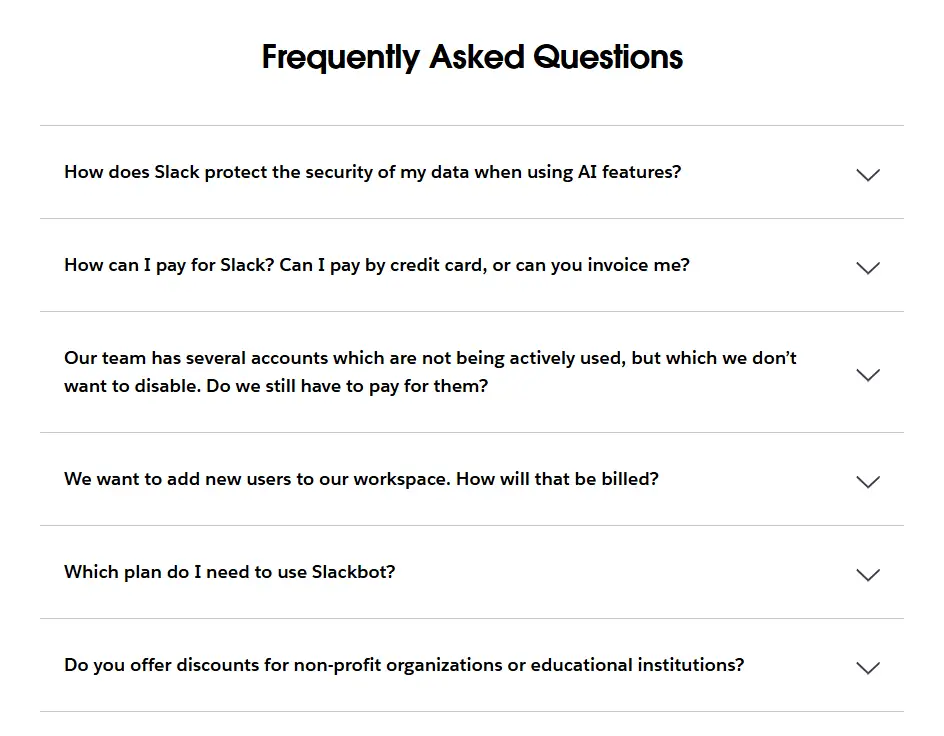
Slack's pricing page answers common billing questions, including how to pay, how inactive accounts are billed, how new users are charged, which plan you need for Slackbot and whether nonprofit or education discounts exist. We have not repeated those answers here because they can change; open the FAQ on the pricing page for the current wording.
Only buy a plan through slack.com or Slack's sales team. There is no "Slack Premium" app or cracked download that unlocks paid features; offers like that are fake and can carry malware. If a price looks far below the rates above, it is not from Slack.
Frequently Asked Questions
Is the Slack download free?
Yes. Downloading and installing Slack costs nothing on any platform, and the app works with every plan. You only pay if your workspace upgrades from the Free plan to Pro, Business+ or Enterprise+. The same app shows paid features automatically once the workspace is on a paid plan.
How much does Slack Pro cost?
On November 6, 2026 Slack's pricing page listed Pro at $7.25 per user per month when paid annually, or $8.75 per user per month when paid monthly, in US dollars. Slack sometimes runs introductory discounts, so the price you see at checkout may be temporarily lower.
What happens to messages on the Slack free plan?
On the Free plan you can view and search messages and files from the last 90 days. Older content is hidden, and messages and files more than one year old are permanently deleted. Workspace owners can choose to keep everything for one year or delete it after 90 days.
Which Slack plan includes Slackbot and AI search answers?
According to Slack's AI guide, search answers, recaps, file summaries, translations and Slackbot are included on Business+ and Enterprise+. Pro gets conversation summaries, huddle notes and automatic search filters, and Slackbot may be available to preview in a limited capacity on Free and Pro.
Can I see old messages after upgrading from the free plan?
Upgrading removes the free plan's message, file and app limits, so history that was only hidden by the 90-day visibility limit can become viewable again. Content older than one year may already have been permanently deleted on the free plan, so upgrade before that happens if you need it.
Do I need a different Slack download for a paid plan?
No. There is only one Slack app per platform. Install it from slack.com or an official app store, sign in to your workspace, and the features your plan includes appear automatically. Ignore any site offering a Slack Premium or unlocked download; those are fake.