
Slack Download for iPhone and iPad: App Store Setup Guide

A Slack download on an iPhone or iPad is simple because there is only one official source: Apple's App Store. The details that trip people up come before and after the install: which iOS version you really need, why the App Store and Slack's help center quote slightly different numbers, and how to keep notifications under control. This guide covers all of it using Slack's and Apple's published listings.
SlackDownload.com is a third-party guide, not affiliated with Slack, Salesforce or Apple, and it never hosts app files.
Slack for iPhone and iPad at a Glance
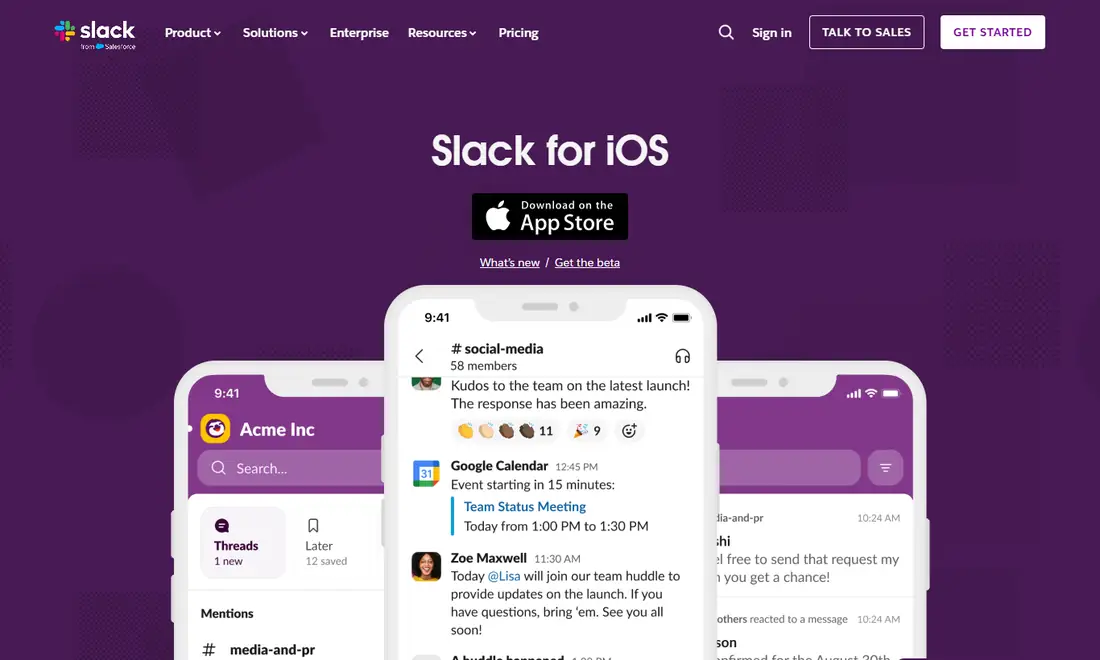
Slack's own Slack for iOS download page simply sends you to the App Store, with links to "What's new" and "Get the beta". There is no separate installer file for iPhone or iPad, and none is needed.
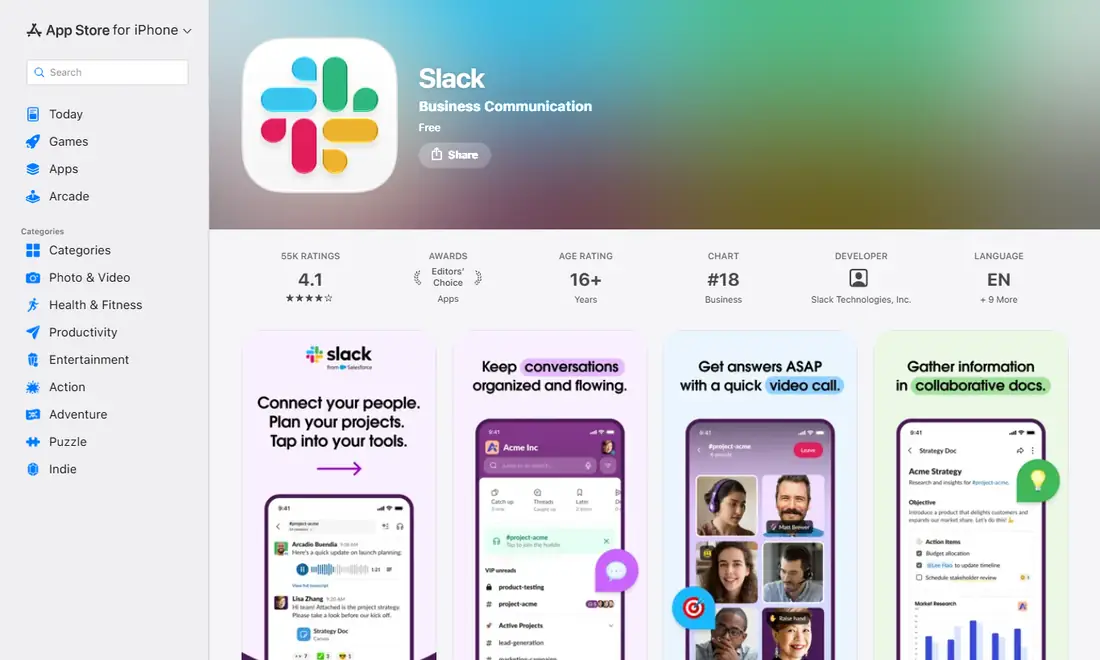
On November 6, 2026, the Slack listing on the App Store (app ID 618783545) showed:
- Version: 26.11.10, which matches the newest entry in Slack's iOS release notes, dated November 4, 2026
- Size: 379.1 MB, for iPhone and iPad
- Compatibility: Requires iOS 17.5 or later (iPadOS 17.5 or later and visionOS 1.2 or later are also listed)
- Seller: SLACK TECHNOLOGIES L.L.C., with Slack Technologies, Inc. shown as developer
- Price and rating: Free, age rating 16+
iOS Requirements: iOS 17 or iOS 17.5?
Here is the one wrinkle worth understanding before you download Slack. Slack's system requirements for using Slack page says iOS 17 or above, with app version 25.05.20 or above. The App Store listing for the current build, however, says "Requires iOS 17.5 or later".
| Source | What it says | What it means for you |
|---|---|---|
| Slack system requirements page | iOS 17 or above; app 25.05.20 or above | The range Slack supports for using the app |
| App Store listing (version 26.11.10) | Requires iOS 17.5 or later / iPadOS 17.5 or later | The minimum to install this particular build |
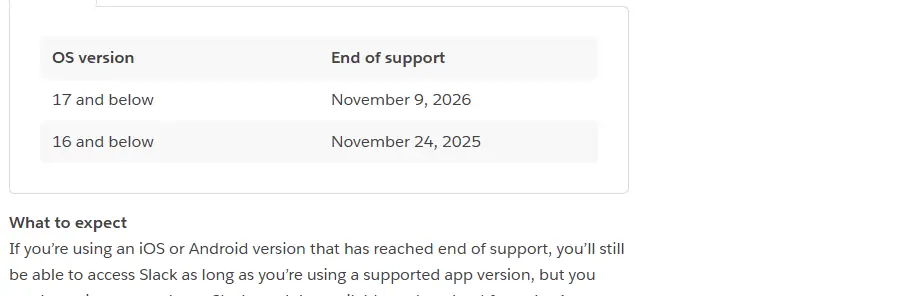
| Slack support lifecycle page | iOS 17 and below: end of support November 9, 2026 | iOS 17 drops off the supported list soon |
Requirements last checked: (Slack revises them every May and November).
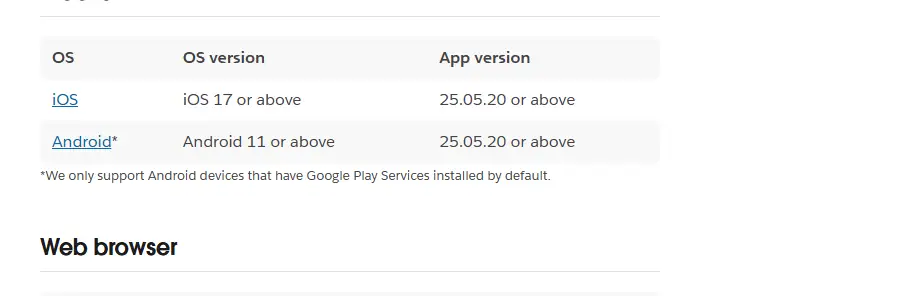
Both statements are accurate; they describe different things. Slack's page is its support policy, while the App Store line is the technical minimum Apple enforces for the version on sale today. In practice, a device on iOS 17.0 to 17.4 may be unable to install the current build even though Slack's page still lists iOS 17. The simplest fix is to update the device to the latest iOS or iPadOS it can run, which you can check in the Settings app.
Heads-up: iOS 17 end of support on November 9, 2026
Slack's support lifecycle page lists iOS 17 and below as reaching end of support on November 9, 2026, together with mobile app version 25.10.50 and below. Check the official requirements page after that date. According to Slack, if your iOS version has reached end of support you can still use Slack on a supported app version, but you won't receive app updates and Slack won't be available to download from the App Store. An unsupported app version is stricter: you are prompted to upgrade and can't access Slack until you do.
If an older iPhone or iPad can't move past iOS 17, plan a device upgrade. Our Slack web app guide explains the browser route on a computer, which doesn't depend on your phone at all.
How to Download Slack on iPhone
- Open the App Store on your iPhone, or follow the App Store badge from slack.com/downloads/ios.
- Search for Slack and open the listing named "Slack" in the Business Communication category.
- Check the seller is SLACK TECHNOLOGIES L.L.C. and skip lookalike "helper" apps.
- Make sure you have space for an app of roughly 379.1 MB, then tap Get and confirm with Face ID, Touch ID or your password.
- Open Slack and sign in with your work email, with Google or Apple if your workspace allows it, or through your company's single sign-on.
- Pick the workspace you want if your email belongs to several, and allow notifications when asked.
Installing Slack on iPad
The same listing covers iPhone and iPad, so the steps are identical: open the App Store, search for Slack, confirm the seller, tap Get and sign in. The listing requires iPadOS 17.5 or later. Slack's iPad app is built for the larger screen, and iPadOS multitasking lets you keep Slack beside a document or browser. Exact multitasking options depend on your iPad model and iPadOS version.
You can be signed in to the same workspaces on iPhone, iPad and a computer at once. If you also use a Mac, our Slack download guide for Mac covers the desktop app, and Android users can follow the Slack download guide for Android.
Keeping Slack Updated on iPhone and iPad
Because Slack's minimum supported app version moves every May and November, staying current isn't optional. There are two layers to keep updated:
- The Slack app. Turn on automatic app updates in your device settings, or update Slack manually from the App Store when an update appears.
- iOS or iPadOS. Keep the operating system current so you stay above the App Store's minimum, which today is iOS 17.5.
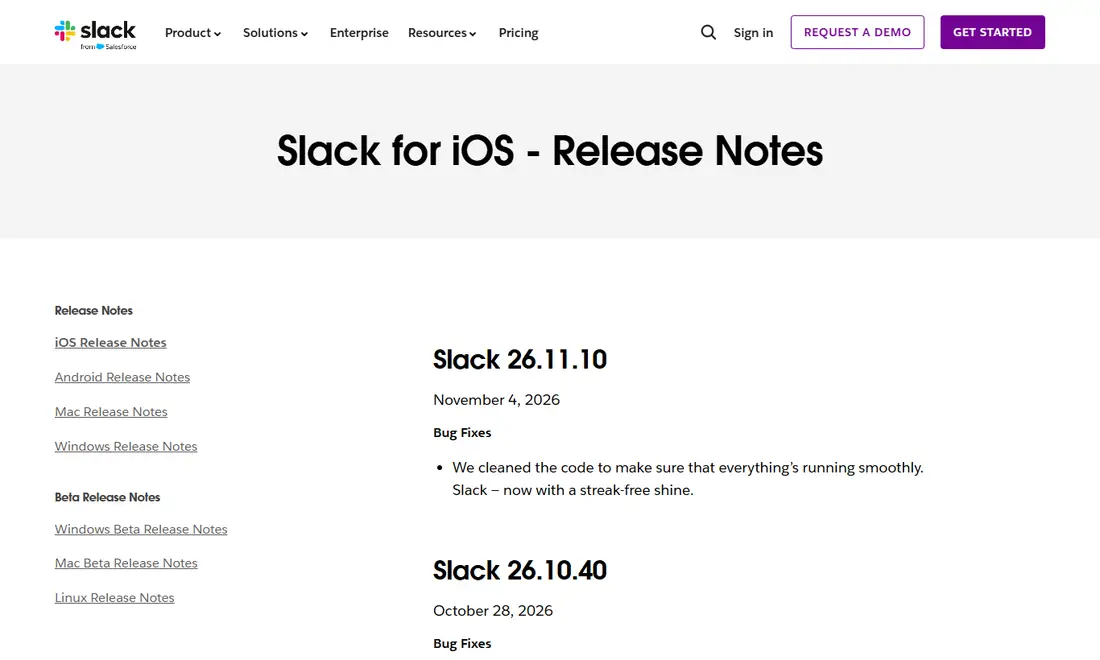
To see what changed, the official Slack for iOS release notes list every build. The top entry on November 6, 2026 was Slack 26.11.10, a bug-fix release dated November 4, 2026.
Notifications, Focus and Pausing Slack
iOS and Slack each hold their own notification controls, and the two work best when set up together. On the iOS side, allow Slack to send notifications and decide whether your Focus modes should silence it outside working hours. Consider showing message previews only when the device is unlocked, so sensitive text doesn't appear on the lock screen.
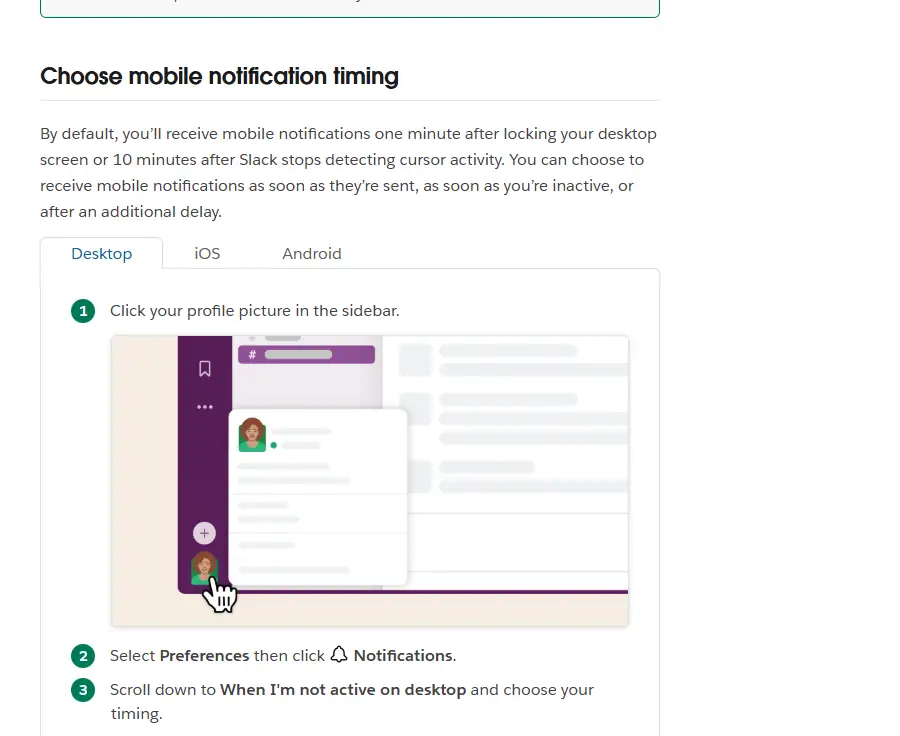
Inside Slack, the help center explains that you can choose Everything or Mentions and direct messages, set channel keywords, and choose mobile notification timing. By default, mobile notifications arrive one minute after you lock your desktop screen or 10 minutes after Slack stops detecting cursor activity, and you can change that so they arrive as soon as they're sent.
For evenings and weekends, Slack lets you pause your Slack notifications for a set time or set a notification schedule, so alerts arrive only on chosen days and hours. Other people see a snooze icon next to your name, and they can override it once per day for an urgent DM. Our Slack notifications guide walks through each setting.
Protecting Slack on Your iPhone or iPad
Slack holds work conversations, so think about who could open it if your device were picked up. Protection mainly comes from the device itself: a strong passcode with Face ID or Touch ID, and a short auto-lock time. Depending on your iOS version, you may also be able to require Face ID or your passcode before a specific app opens. Organisations on paid plans may add mobile device management or Slack's enterprise security controls, which can change how the app behaves; if your Slack works differently from a friend's, your company's settings are the likely reason, and questions belong with your IT team.
Troubleshooting a Slack Download on iPhone or iPad
| Problem | Likely cause | What to try |
|---|---|---|
| App Store won't install Slack | Device below iOS or iPadOS 17.5 | Update iOS if your device allows it |
| Download stalls or fails | Not enough storage or a weak connection | Free up space for the 379.1 MB app and retry on stable Wi-Fi |
| Slack asks you to upgrade before opening | App version reached end of support | Update Slack from the App Store |
| No notifications | iOS permission off, Focus active or Slack paused | Check iOS notification settings, Focus and Slack's own preferences |
| Can't sign in | Wrong email or single sign-on required | Use your workspace email or your company's SSO; ask your admin |
If problems persist, deleting and reinstalling Slack from the App Store is safe: your messages and files are stored in your workspace and return when you sign back in. Company-managed devices may apply their own policies, so check with IT if Slack behaves differently from a colleague's.
Safety: Only the Official App Store Listing
On iPhone and iPad there is no legitimate Slack installer outside the App Store. Ignore websites offering Slack "IPA" files, configuration profiles or paid "premium" builds, and confirm the seller reads SLACK TECHNOLOGIES L.L.C. before tapping Get. Slack is free to download; any features beyond the free plan come from your workspace's paid plan, never from a different app. For more on spotting fakes, see our Slack download safety guide.
Frequently Asked Questions
What iOS version do I need for Slack?
Slack's system requirements page lists iOS 17 or above with app version 25.05.20 or above. The App Store listing for the current build, version 26.11.10, says it requires iOS 17.5 or later, so updating to at least iOS 17.5 is the practical minimum for a fresh install today.
Can I lock Slack with Face ID?
Slack relies mainly on your device security: a passcode with Face ID or Touch ID protects the app along with everything else. Depending on your iOS version, you may be able to require Face ID before Slack opens. Your company may also apply its own mobile security policies through device management or Slack enterprise controls.
Does Slack support Split View on iPad?
Slack's iPad app is designed for the larger screen and works with iPadOS multitasking, so you can keep a conversation beside a document, browser or calendar. Which layouts you get, such as Split View, Slide Over or Stage Manager, depends on your iPad model and iPadOS version rather than on Slack.
Can I use Slack on my iPhone and iPad at the same time?
Yes. The same App Store listing covers both devices, and you can stay signed in to the same workspaces on iPhone, iPad and a computer at once. Notification preferences you set in Slack apply to your account, while iOS notification and Focus settings are set separately on each device.
How do I stop Slack notifications in the evening without signing out?
Slack lets you pause notifications for a chosen time or set a notification schedule so alerts only arrive on chosen days and hours. You can combine that with an iOS Focus that silences Slack after work. Colleagues see a snooze icon and can override it once a day for urgent DMs.
Is Slack free on the App Store?
Yes. The App Store listing shows Slack as Free with seller SLACK TECHNOLOGIES L.L.C. Which features you see depends on your workspace plan: the free plan limits visible message history to 90 days, while paid plans add more. There is no separate paid or premium Slack app to download.